Lab notes
This build is the opposite of the haunted house: no meshes to light, no fog volume—just math, a buffer, and a point cloud that pretends to be a galaxy. The question was how far you can push a single `Points` object in Three.js before the laptop fans remind you that “100,000” is a real number.
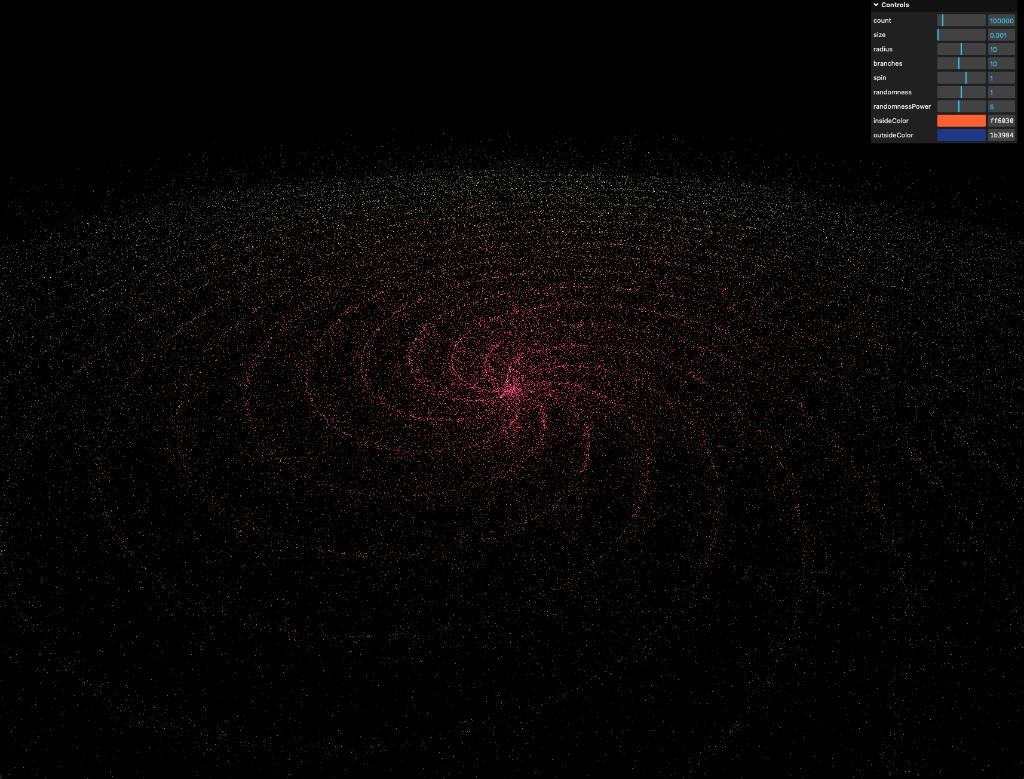
The screenshot is honest: there is a control panel in the corner because the piece is meant to be played with. Parameters are not buried in code—they are the interface. When someone drags “branches” or “randomnessPower,” they are editing the same formulas that place every star.
One geometry, many stars
Each particle is not its own mesh. The galaxy is a `BufferGeometry` with interleaved attributes: positions, and usually colors if you want per-star tint without a heavy fragment shader loop. Instancing is the other path, but raw `BufferAttribute` arrays keep the mental model simple for a lab: fill typed arrays once, upload, draw.
The draw call stays flat: one material, one draw range. That is how you keep orbit controls smooth while the count slider climbs toward six figures.
Spiral arms from trigonometry
Arms come from partitioning the particle index into branches, then wrapping each particle around the circle with an angle that increases with radius—your spin term. Sine and cosine turn that angle into x and z; a radius curve (often a power curve) keeps the core dense and the rim thin.
Randomness is layered: a base jitter so arms look organic, then a power curve on the jitter so most stars hug the arm but a few drift into the void. Tuning `randomness` vs `randomnessPower` is where the galaxy stops looking like a cake decoration and starts looking like weather.
Color as a radial gradient
The core and the rim do not share one flat albedo. Distance from the center (or normalized radius) drives a mix between an inside color and an outside color—warm oranges and reds where gravity would pretend to be strongest, cooler tones where the arm thins out.
In the live demo those colors are exposed as hex pickers: the gradient is not baked. That makes the piece useful as a sandbox—you can chase a teal-and-violet nebula or a classic Hubble-palette look without recompiling.
Size, radius, and readability
Particle `size` in screen space is a balancing act: too large and the galaxy becomes cotton; too small and laptop panels eat the detail. Radius scales the whole formation in world units so the camera framing stays predictable when you tweak counts.
The black background is a feature. Without a skydome competing for attention, the point sprite (or circular point) falloff reads cleanly and the spiral structure stays legible from a tilted top-down view—the default “overview” of the generator.
Why ship it on static hosting
Like the other lab pieces, this lives on GitHub Pages: build, upload, link. No API, no database—only a bundle and WebGL. That keeps the focus on the algorithm and the frame budget.
Open the live build, pull the sliders, and watch the arms shear. If it feels like you are sculpting a weather system rather than editing JSON, the generator is doing what it was written for.